GenAI & Agentic AI Mastery Program

From zero to a
production-ready AI engineer.

Production AI Engineering — build, deploy, secure and evaluate agentic AI systems. Ten modules in the sequence production actually demands: the seven engineerings, Python and async, prompts and agents, loops and context, RAG, graph, the AWS platform, the harness around it, evaluation, and a deployed capstone. Three production-grade systems, not twenty-five disconnected mini-projects. Not tutorials. Real systems.

October 2026 batch · starts Thursday 8 October · Monday–Saturday, 7:00–9:00 AM IST
Mentored by Prudhvi Akella · Data & AI Architect · 13+ years · 800+ engineers trained
Program at a glance
Batch startsThu 8 Oct 2026
ScheduleMon–Sat · 7–9 AM IST
Modules10 Modules
Real projects3 Projects
CapstoneMulti-agent on AgentCore
DeploymentProduction · AWS
Full program ₹30,000
Skills & tools you'll master

A rare Data + AI skillset, end to end.

Thirty-five-plus production skills across the full stack — vector databases and embedding models, hybrid and semantic search, graph databases and workflow graphs, MCP and A2A, the AWS production harness, and evaluation as a first-class discipline. The combination that makes you hard to replace.

What you'll achieve

Ten capabilities that define a
production AI engineer.

Program structure

10 modules · 3 projects · one deployed capstone.

A complete production-grade journey. Module 00 names all seven engineerings; Modules 02–05 go deep on one or two at a time; Module 06 is the AWS platform everything deploys on; Module 07 is the harness around it; Module 08 measures it; Module 09 puts everything into one deployed, evaluated system.

Click any module to expand its full breakdown

00

The Seven Engineerings

The vocabulary and the shape of a real AI system.

An AI system is not one model call. It is seven layers of engineering around a model, and each layer answers one question. You write no code in this module — you run one notebook, read one real production system, and learn the vocabulary the rest of the course uses.

Prompt

How should the model behave? One call, a system message and a user message — and a stateless model that sees nothing else.

Agent

What can the model do? A model plus tools; the model only decides which tool and with what arguments — your code runs it.

Context

What does the model see this turn? System prompt, history, memory hits, retrieved chunks, tool results, the question.

Loop

When does it stop, and what if it goes wrong? Step budgets, retry limits, human pauses and a structured exit.

Graph

How does the agent run, and how do its facts connect? A workflow graph and a knowledge graph.

RAG

Where do the facts come from? A vector database and an embedding model — and why most RAG failures are silent.

Harness

Can you trust it in production? Middleware, guardrails, budgets, tool gateways, secrets, IAM, tracing, deployment.

Platform

Where does it all run? The AWS layer every project in this course is deployed on.

Checkpoint — you are given the capstone architecture diagram and label all seven engineerings on it. The same system you build in Module 09.
01

Python + Async

OOP, databases three ways, FastAPI, asyncio, SSE streaming & AI-assisted engineering.

The engineering bedrock. By the end you can write the Python used in every later module, query a database three ways and know when each is right, serve a model behind FastAPI, stream a response over Server-Sent Events, and run several slow calls in parallel with a timeout on each.

Functions and classes

Model a clinical trial as objects — a trial, its sponsor, its sites.

Lists, dicts, sets, tuples

Load trial data from JSON and count sites per country.

Exceptions and files

Read 20 files where one is broken, and keep going.

Databases from Python

The same query in raw SQL, then an ORM, then with a connection pool.

FastAPI

One endpoint that takes a question and returns a model’s answer as JSON.

The event loop

Why await frees the loop while a network call is in flight.

gather · wait_for · create_task

Three fake tools of 1s, 2s and 5s with a 2s timeout: finish in ~2s, not 8s.

Streaming modes & SSE

Stream a FastAPI response token by token over Server-Sent Events; sync vs async generators, and where WebSockets fit instead.

Async in a real agent

Read a production agent’s startup code and explain why it opens its tool session per question.

Workshop — AI-assisted engineering

Use Claude Code, Cursor or GitHub Copilot on this course’s own repository: understand unfamiliar code, generate tests, refactor, debug, write docs, review a PR — and see where it is confidently wrong.

Checkpoint — your FastAPI endpoint calls two tools in parallel, returns inside the timeout and streams over SSE. You keep this app; in Module 06 you deploy it on AWS as the vs-NLQ back end.
02

Agent + Prompt Engineering

Prompts, structured output, tools, memory, MCP and sub-agents — with LangChain and LangGraph.

Write a prompt that returns JSON you can rely on, give a model tools and know exactly what it decides versus what your code decides, connect an agent to an external tool server over MCP, and have one agent call another as a tool.

Prompt engineering

How a model call works

Tokens, cost, temperature; OpenAI, Anthropic and Amazon Bedrock behind one interface.

The prompting ladder

Plain prompt, system prompt, few-shot, structured output with a schema.

Production prompts

Read three real system prompts and find the rules that stop the model guessing.

Grounded answers

Answer from the given text only, cite the page, say when the text does not contain it.

Chain of thought

Make the model reason before answering, and keep the reasoning out of the reply.

Advanced techniques

Self-refine, tree of thoughts, self-consistency — what each costs and when it is worth it.

Bedrock Prompt Management

Prompts as versioned resources with variables, not strings buried in code.

Agent engineering

Your first agent

The same question as a plain call and as a LangGraph agent — see the difference.

Tools

Write two tools and follow the four messages a single tool call produces.

Web search as a tool

Answer questions about events after the model’s training cutoff.

Short-term memory

A conversation that remembers, using a LangGraph checkpointer and a thread id.

Images and audio

Send a chart to the model and ask what it shows.

MCP

Connect to a local tool server, then a remote one over HTTP.

Sub-agents

One LangGraph orchestrator calling specialist agents as tools.

SQL and RAG agents

An agent that writes SQL against a real database — your vs-NLQ SQL specialist.

Checkpoint — an agent with two tools of your own and structured output, running outside a notebook.
03

Loop + Context Engineering

Budgets, human approval, state, and what goes into the context window.

Stop an agent looping forever and make it fail honestly instead of inventing an answer. Pause it for human approval and resume it later. Decide what goes into the context window, and change the prompt, model or tools per request.

Loop engineering

Watch a loop run

Stream every step: tokens, reasoning, tool call, tool result, final answer.

An agent is a graph

The LangGraph model node, the tools node and the state flowing between them.

State

A tool writes to shared state and a later tool reads it.

Human in the loop

Approve, reject or edit a tool call before it runs.

Budgets and honest failure

Cap retries and searches; return “I cannot answer this” instead of guessing.

A structured exit

Why an agent that can answer without calling a tool eventually will.

Context engineering

Context, state and memory

Pass user data to tools without putting it in the prompt.

Trimming and summarising

Keep a long conversation inside the window without losing the thread.

Dynamic prompts, models, tools

Different role, different tools; a cheap model for easy turns.

Keep bulk data out

A query returns 400 rows; the model sees a short summary and the answer still uses all 400.

Schema in the prompt or a tool

When a database schema fits in the prompt, and what to do when it does not.

Semantic and procedural memory

Reuse a past answer; remember how a task is done here.

A context budget

Token budgets per section, and what gets dropped first.

Checkpoint — an email agent that refuses to send before login and pauses for your approval after it.
04

RAG Engineering

Vector databases, embedding models, hybrid search, parsing, chunking, retrieval & multimodal.

Choose between vector, keyword and hybrid search and tune the balance. Work confidently with vector databases and embedding models. Turn a messy 200-page PDF into chunks that retrieve well, explain why a chunk did or did not come back, and spot a pipeline that reports success while quietly dropping content.

Vector databases

Index 751 products in Pinecone, search them, filter by metadata, compare index types.

Hybrid search

Build BM25 yourself, then blend it with vector search and move the dial.

Parsing

Run a real parser over a clinical trial PDF and read its confidence report.

Chunking

Chunk the same document three ways and see what each does to retrieval.

Tables and headings

Make a number inside a table findable; fix headings the parser got wrong.

Embedding models & indexing

Compare embedding models, embed with a cache, upsert, and resume a run that stopped halfway.

Retrieval

Rerank results, then pull in the neighbouring chunks so the answer is complete.

Silent failures

Read the stage reports and find the document that ingested “successfully” with nothing in it.

The full corpus

Ingest 20 PDFs with dry runs, per-document runs and forced re-runs.

Lab — the multimodal agent

Split text, tables and figures out of one PDF, send the figures to a vision model for an indexable description, put all three chunk types in one store, and answer a question whose answer is only in a chart.

Checkpoint — P1 milestone: three PDFs ingested, and you can explain one bad chunk from the report.
05

Graph Engineering

Two kinds of graph — the workflow graph an agent runs on, and the knowledge graph its facts live in.

Graph engineering is two different things that share a shape. A workflow graph is how an agent runs — nodes, edges, a typed state object, conditional routing and cycles. A knowledge graph is how its facts are stored. This module teaches both, in that order, because by the end your capstone supervisor is a workflow graph whose specialists query a knowledge graph.

Workflow graphs — how an agent runs

Nodes, edges, state

A typed state schema and the reducers that merge each node’s output into it — the single thing that makes a graph debuggable.

Conditional edges and cycles

Route on state, not on a prompt; build a retry cycle that provably terminates with a recursion limit.

Parallel branches and fan-in

Run the vector search and the graph query at once, then merge both into one state without either overwriting the other.

Subgraphs

Make a specialist its own graph and mount it as a node in the parent — how one team ships an agent another team embeds.

Agent topologies

Single agent, supervisor, hierarchical supervisor, network and pipeline — the same task four ways, compared on token cost, latency and failure modes.

Checkpoints, resume, time travel

Persist graph state to Postgres, kill the process mid-run and resume it, then rewind to an earlier checkpoint and take a different branch.

Knowledge graphs — how the facts connect

Why graph databases

The same question as SQL joins and as a graph query.

The property graph model

Nodes, labels, relationships, properties, and naming that stays readable.

Cypher fundamentals

MATCH, WHERE, constraints and bulk loading — and what happens with missing values.

Aggregation and paths

Grouping and pipelines with WITH; multi-hop, variable-length and shortest-path queries.

Build the graph

Three layers over the same 20 PDFs, each node recording where it came from.

Score the extraction

Compare what the model extracted against the public registry, field by field.

Graph or vector

Four question shapes, and which store answers each.

Checkpoint — P1 milestone: the graph is built and extraction accuracy is measured.
06

AWS Cloud Infrastructure

IAM, S3, Lambda, DynamoDB, VPC, ECR, AWS Batch, ECS Fargate, ALB, API Gateway, RDS, Bedrock & AgentCore.

Every project in this course is deployed on AWS, taught in three tracks. Track A deploys your ingestion pipeline on AWS Batch; Track B deploys your Module 01 FastAPI app as the vs-NLQ back end; Track C is the agent platform. By the end you can create least-privilege IAM roles, run heavy jobs on EC2 Spot, deploy an S3-triggered pipeline that alerts through SNS, run a containerised app on Fargate behind an ALB and API Gateway, deploy an agent on AgentCore Runtime whose tools sit behind AgentCore Gateway — and tear it all down with nothing left billing.

IAMA least-privilege role for every component.
AWS BudgetsA cost alarm set before anything is deployed.
Amazon S3Raw PDFs, parsed documents, caches; an upload starts ingestion.
Secrets ManagerPinecone, Neo4j and API credentials.
CloudWatchLogs, metrics, dashboards and alarms.
Amazon SNSOne alert topic — failures and budget alarms arrive by email.
AWS LambdaPipeline triggers, error handling and agent tools.
DynamoDB + StreamsAn audit row per document per stage; the stream starts the next stage.
Amazon VPCSubnets, security groups, NAT gateway, Transit Gateway.
Amazon ECRContainer images for batch workers and agents.
AWS Batch on EC2 SpotHeavy parsing too long for Lambda; job queues per size lane; scales to zero.
ECS on FargateRuns the FastAPI + React application.
Application Load BalancerSpreads traffic across tasks, with health checks.
API GatewayA public API with throttling and auth.
RDS PostgreSQLvs-NLQ data, agent checkpoints, MLflow backend.
Amazon BedrockModels for the deployed agents, and what a call costs.
AgentCore RuntimeHosts agents as ARM64 containers from ECR.
AgentCore GatewayTools over MCP, reachable only with IAM-signed calls.
Checkpoint — P1 milestone: one PDF uploaded to S3 runs as a Batch job, reaches Pinecone and Neo4j, the DynamoDB audit shows every stage, a broken PDF triggers the SNS email, and your account is clean after teardown.
07

Harness Engineering

Guardrails in three layers, middleware, and the A2A protocol.

Put guardrails in all three places and say what each one catches. Write middleware that wraps an agent and know which wrapper runs first. Build an answer from what actually happened instead of what the model says happened. And make two agents work together over A2A.

01

Input Guardrails

Gateway · deterministic · sub-millisecond
  • Prompt-injection detection
  • PII in the question — redact or reject
  • Out-of-domain — reject with a message
  • Bedrock Guardrails content filters
  • Never an LLM — pure functions
  • The agent is never called on failure
02

Output Guardrails

Evaluator · judge + code checks
  • Faithfulness against the sources
  • Personal data masked on the way out
  • Contradiction check catches confident-wrong
  • Answers built from the record, not the claim
  • Hard fail → safe fallback response
  • Every answer saved with its query and trace
03

Action Guardrails

Agent · pure functions
  • Reject a write query outright
  • Force a row limit on every query
  • A read-only DB user as a second line
  • Tool access by role
  • Approval before a risky action
  • Capped retries and tool calls
Middleware and the A2A protocol

Middleware

Wrap an agent in layers and prove the order they run in.

A2A basics

Agent card, task, artifact — the lifecycle, on the official A2A Python SDK.

Long tasks

Progress updates, streaming and cancellation.

Waiting for the user

A task that pauses with input-required and continues on the same task and context.

A2A on AgentCore

A supervisor on AgentCore Runtime calling specialists with invoke_agent_runtime.

Evidence and reports

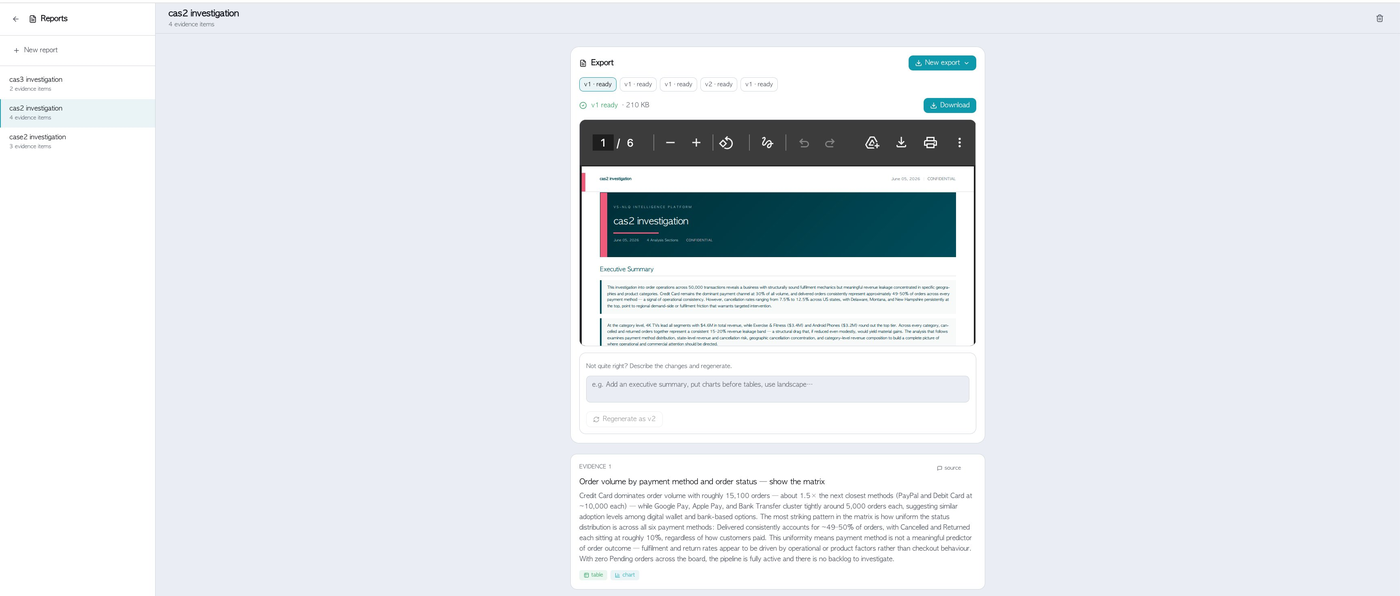
Save every answer with its query, result and trace; export a versioned PDF to S3.

Checkpoint — write down every place your system trusts something, and which layer stops a bad query if the others fail.
08

Evaluation Engineering (AgentOps)

Batch evals before release, online evals in production.

Build a question set that does not flatter your own system. Prove a change made retrieval better or worse with numbers. Score answers with a model judge and check the judge against human labels. Then watch a live system for quality, cost, latency and drift — the operational discipline the industry calls AgentOps.

Develop → Trace → Evaluate → Deploy → Monitor → Detect regression → Collect feedback → Improve → Re-evaluate.
Batch evals — before release

A fair question set

Questions rewritten in a user’s words, sampled across tables, figures and short passages.

Retrieval regression

Recall at 1, 3 and 5 per category; save a baseline and compare against it.

Exact metrics

Precision, recall, MRR, NDCG, exact match and token overlap.

Model as judge

Faithfulness, relevance and completeness — checked against 20 human labels.

Evaluating agents

Did it write correct queries, pick the right tool, route to the right specialist?

Evals as a gate

A drop against the baseline fails the build.

Online evals — in production

Tracing

One trace per request with every step, its tokens and cost, in LangSmith or MLflow.

Scoring live traffic

Judge a sample of real requests, off the request path so users wait for nothing.

Signals you already have

Guardrail hits and “cannot answer” rates are quality data.

Dashboards and alerts

CloudWatch dashboards and SNS alarms: latency, cost per answer, judge scores, drift.

Closing the loop

Turn bad production traces into next week’s test questions.

An admin console

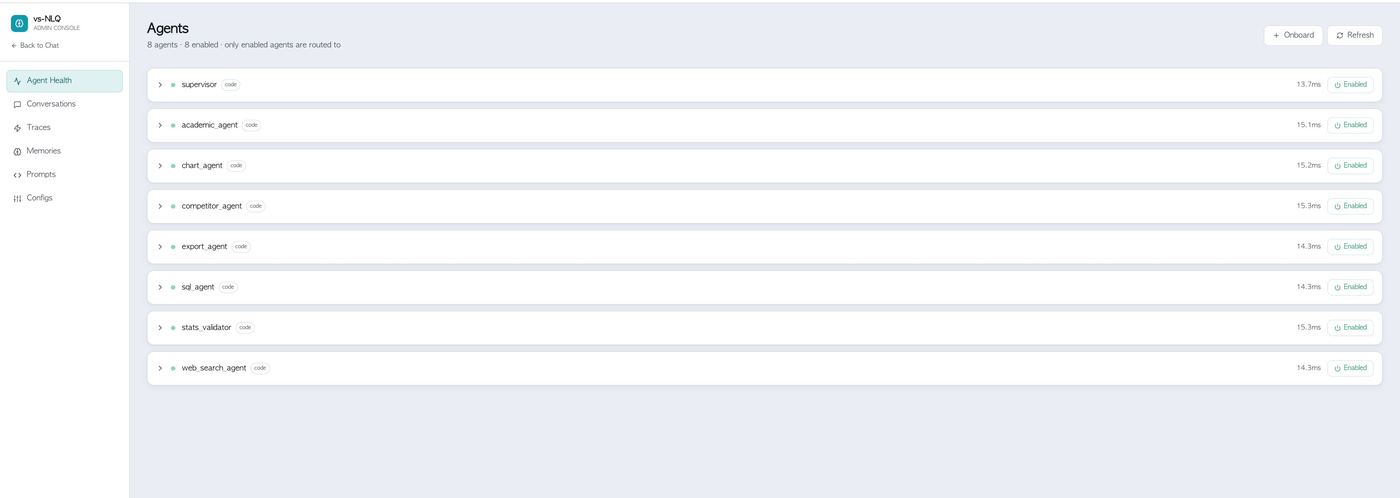
Agent health, traces, stored memories and live prompts on one page.

Checkpoint — a baseline, one change, and the per-category difference.
09

Capstone

A deployed multi-agent system, evaluated and demoed.

You deploy a three-agent system on Bedrock AgentCore, ask it real questions about the documents you ingested yourself, add a specialist of your own, and evaluate it both before and after release. A supervisor picks the specialists a question needs — a graph agent over Neo4j, a search agent over Pinecone — and assembles one answer from what they return.

Prompt

The system prompt of each agent.

Agent

Three tools per specialist; one routing tool in the supervisor.

Context

Summaries go to the model, full results stay in state.

Loop

Repair, search and call budgets; a structured exit.

Graph

The agent loop itself, and the knowledge graph behind the graph agent.

RAG

The index you built in P1, behind the search agent.

Harness

Bedrock Guardrails, a read-only database user, answers built from state, A2A.

Platform

AgentCore Runtime and Gateway, Lambda, ECR, Secrets Manager, IAM, Bedrock, CloudWatch.

Evaluation

Routing tested before release; traces, judges and feedback after.

Demo day — ten minutes: your system answering live questions, your added specialist, and your evaluation dashboard.
Three production-grade projects

Real enterprise data.
Real deployment.

Three production-grade systems, not twenty-five disconnected mini-projects. Every module adds a working piece to at least one of them — nothing is a toy exercise that gets thrown away. The clinical-trial projects share the same 20 PDFs, so the capstone answers questions about data you ingested yourself.

P1 · RAG + Retrieval

Distributed Ingestion + Hybrid Retrieval Engine

Clinical trials — a document pipeline that moves a PDF from an S3 upload all the way into a vector store and a knowledge graph.
  • PDF → S3 → Lambda → AWS Batch on EC2 Spot → parsing, chunking and embedding
  • Chunks embedded into Pinecone, with hybrid vector + BM25 retrieval and reranking
  • A three-layer knowledge graph in Neo4j, each node recording the document it came from
  • A DynamoDB audit trail per document per stage, with an SNS email on failure
  • Built locally first, then the same code moved to AWS, then measured against a retrieval baseline
  • Extraction accuracy scored field by field against the public trial registry
DoclingPineconeNeo4j + CypherAWS BatchLambdaDynamoDBSNSMLflow
P2 · Capstone

Capstone Multi-Agent System

Clinical trials — agents built directly on the vector store and knowledge graph you populated in P1, deployed on Bedrock AgentCore.
  • A supervisor built as a LangGraph workflow graph, routing to the specialists a question needs
  • A graph agent over Neo4j and a search agent over Pinecone — one answer assembled from both
  • Deployed on AgentCore Runtime, with tools behind AgentCore Gateway over MCP and IAM-signed calls
  • Specialists coordinated over the A2A protocol — agent cards, tasks, artifacts and cancellation
  • Bedrock Guardrails, a read-only database user, and answers built from state rather than from the model's claim
  • A specialist agent of your own design that routes correctly with no change to the others
  • Routing tested before release; traces, model judges and user feedback after
LangGraphAWS AgentCoreBedrockMCPA2ANeo4jPineconeCloudWatch
P3 · Multi-Agent Analytics

vs-NLQ — Multi-Agent Intelligence Platform

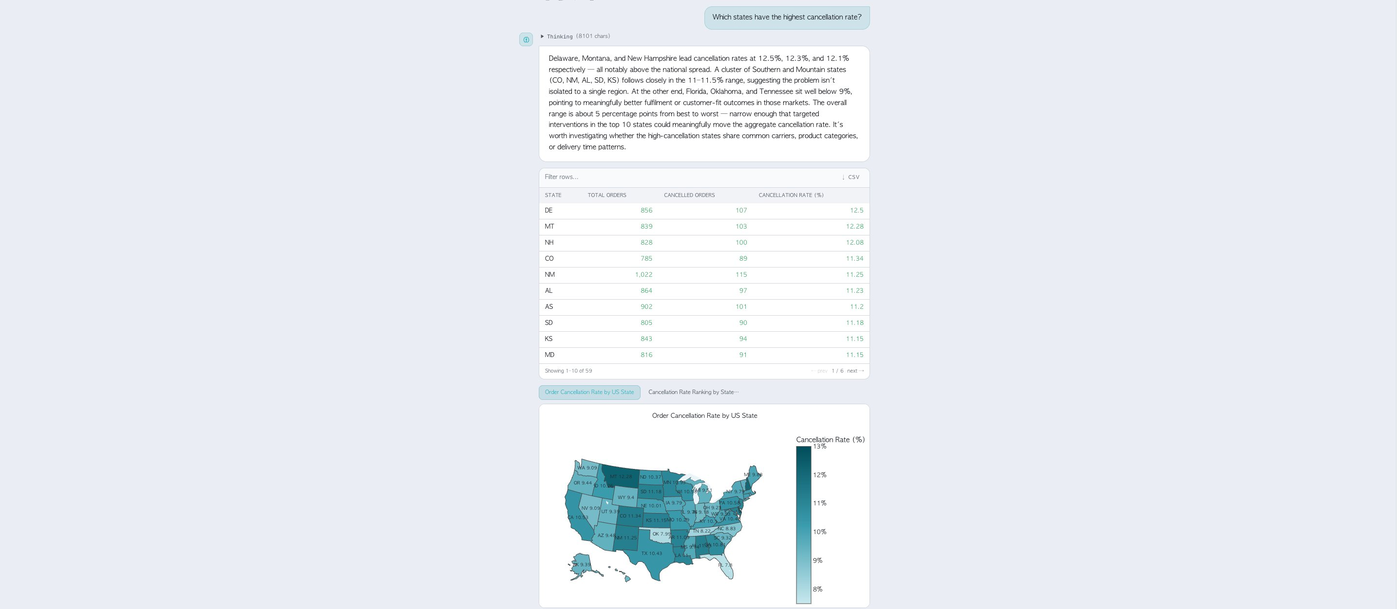
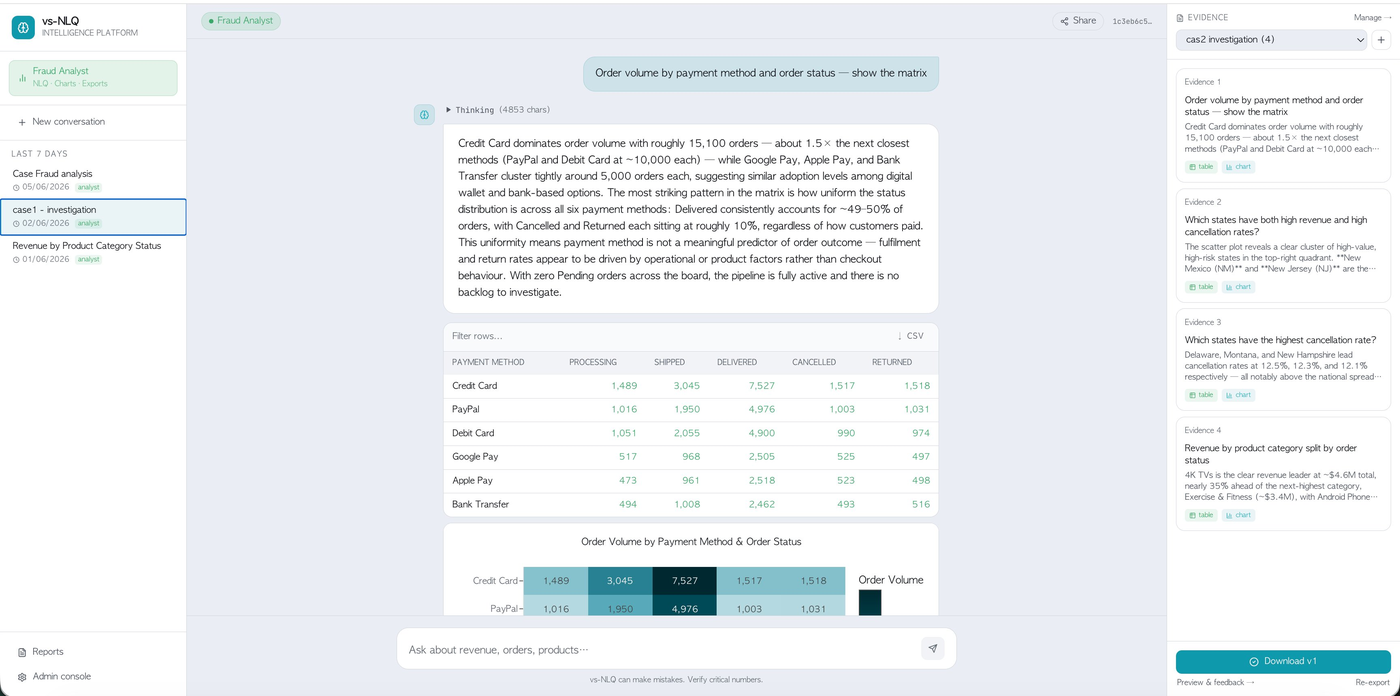
E-commerce & fraud analytics — ask in plain English, get tables, charts, maps and exportable investigation reports.
  • Natural language → SQL & Cypher over a real e-commerce database and graph
  • Supervisor routing across 8 specialist agents — SQL, Cypher, chart, stats validator, competitor, academic, web search and export
  • Input / output / action guardrails with semantic & procedural memory
  • Evidence collection → auto-generated, versioned PDF reports
  • React + FastAPI on ECS Fargate with RDS PostgreSQL; agents on AgentCore
  • An admin console for traces, memories, prompts and agent health — with live requests scored
  • Built one piece per module, so you have a working version well before the capstone
LangGraphAWS AgentCoreBedrockLangSmithRDS PostgreSQLDynamoDBNeo4jFastAPIReact
How you are assessed — checkpoints 30% · P1 ingestion engine 20% · P2 capstone multi-agent system 30% · P3 vs-NLQ analytics platform 20%.
Prudhvi Akella, Data & AI Architect
13+ yrs
Enterprise AI
Your instructor

Prudhvi Akella

Data & AI Architect
  • Built production RAG + Agentic AI systems for global enterprise clients
  • Architected multi-agent platforms on AWS Bedrock + AgentCore
  • Expert in LangChain · LangGraph · MCP · A2A · LLMOps
  • Designed distributed data pipelines processing millions of records at enterprise scale
"Every project in this course is based on real, production-grade AI systems I have built for global enterprises. Not tutorials. Real systems."
13+
Years experience
800+
Engineers trained
Who it's for

Built for engineers who want
to ship, not just to learn.

→ This is for you if

  • You're a software or backend engineer moving into AI
  • You're a data engineer or scientist building GenAI systems
  • You're an ML practitioner who wants production, not notebooks
  • You're targeting AI architect / L6-level system-design roles

✓ What you'll need

  • Programming in any language — Module 01 teaches the Python this course needs, from the basics
  • SQL at the level of SELECT, JOIN and GROUP BY; comfort with a terminal and git
  • An AWS account with Bedrock model access (~₹2,000–3,500 if torn down after each lab)
  • Around 6–8 focused hours a week, plus the live 7–9 AM IST sessions
Enroll

One program. Everything you need to go production-ready.

Mentored, production-grade AI engineering — with three deployed systems you can put your name on. October 2026 batch: Monday–Saturday, 7:00–9:00 AM IST, starting Thursday 8 October.

  • 10 in-depth modules
  • 3 real production projects
  • Live sessions, Mon–Sat 7–9 AM IST
  • Production deployment on AWS
  • Direct mentorship from Prudhvi
  • Measured results, not just diagrams
Full program
₹30,000
10 modules · 3 projects · Mon–Sat, 7–9 AM IST
Apply now
Takes 30 seconds · confirm your seat on WhatsApp
Questions

Frequently asked.

Next cohort

Become the engineer who ships
real GenAI systems.

Join 800+ engineers who've trained with VidyaSankalp. The October 2026 batch starts Thursday 8 October — Monday to Saturday, 7:00–9:00 AM IST.